Google Business Profile Optimization: A Simple Guide to Better Local Visibility
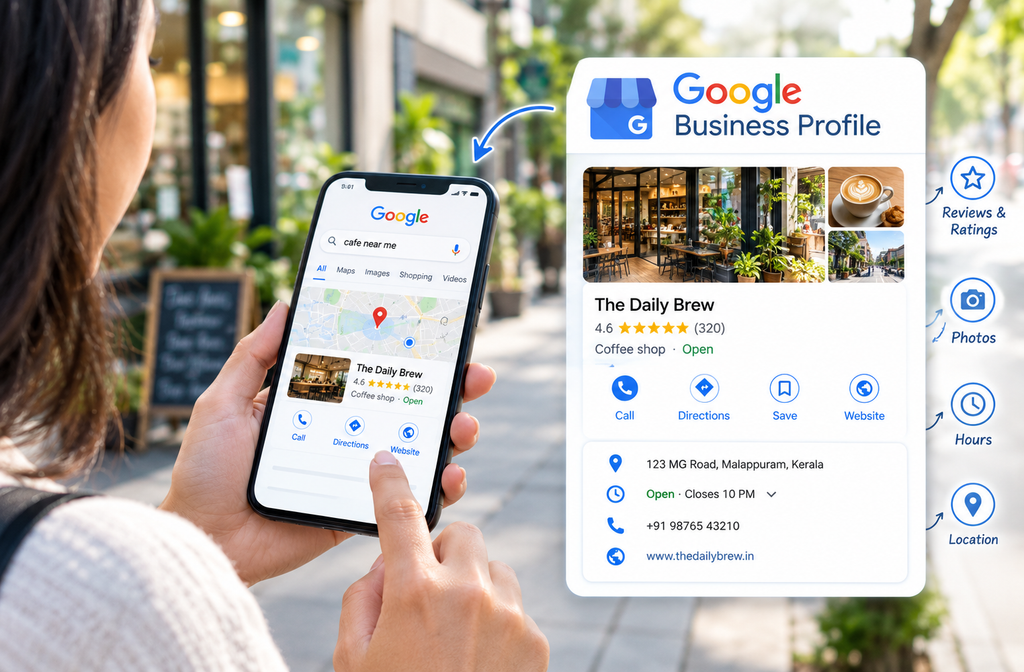
Google Business Profile optimization helps small businesses improve their local online presence and makes it easier for nearby customers to find their services. When someone searches for a service on Google using their phone, they may see a business profile with its name, star rating, photos, location, and opening hours before visiting the website.
A complete and accurate profile helps potential customers understand what your business offers and how to contact you. By updating business information, uploading relevant photos, and responding to customer reviews, you can build trust and make it easier for people to choose your business. In this guide, you’ll learn practical steps to optimize your profile, strengthen your local online presence, and help customers find your business more easily.
Table of Contents
Why Google Business Profile Optimization Matters
Your profile acts as a digital shop window. A passerby might decide in seconds whether to step inside, and a searcher decides just as quickly whether to call. When your profile is complete and active, it signals that your business is open, trustworthy, and ready to serve.
It also gives you an edge over local rivals. Plenty of owners claim their listing and then forget about it. If you put in a few focused hours, you can leave most of your neighbors behind, and the work costs nothing except your time.
How to Claim and Verify Your Google Business Profile
You cannot change much until you prove you manage the listing. Start by searching for your business name in Google Maps. If your profile shows up, select the option to claim it and follow the on-screen steps. If nothing appears, you’ll need to create a new profile through the Google Business Profile site.
Most owners verify by receiving a postcard at their business address that contains a short code. Some categories qualify for a phone call or email instead. Once you enter the code in your dashboard, you gain access to editing, posting, and performance data. If a former employee or a web designer set up the listing years ago, you can submit an ownership request through the same process.
For step-by-step instructions, visit Google’s official guide to adding or claiming your Business Profile.
After verification, review your Google Business Profile details carefully and make sure all the information is accurate. Google Business Profile optimization starts with keeping your business information complete, updated, and consistent so customers can easily find and contact you.
Google Business Profile Optimization: Complete Every Section
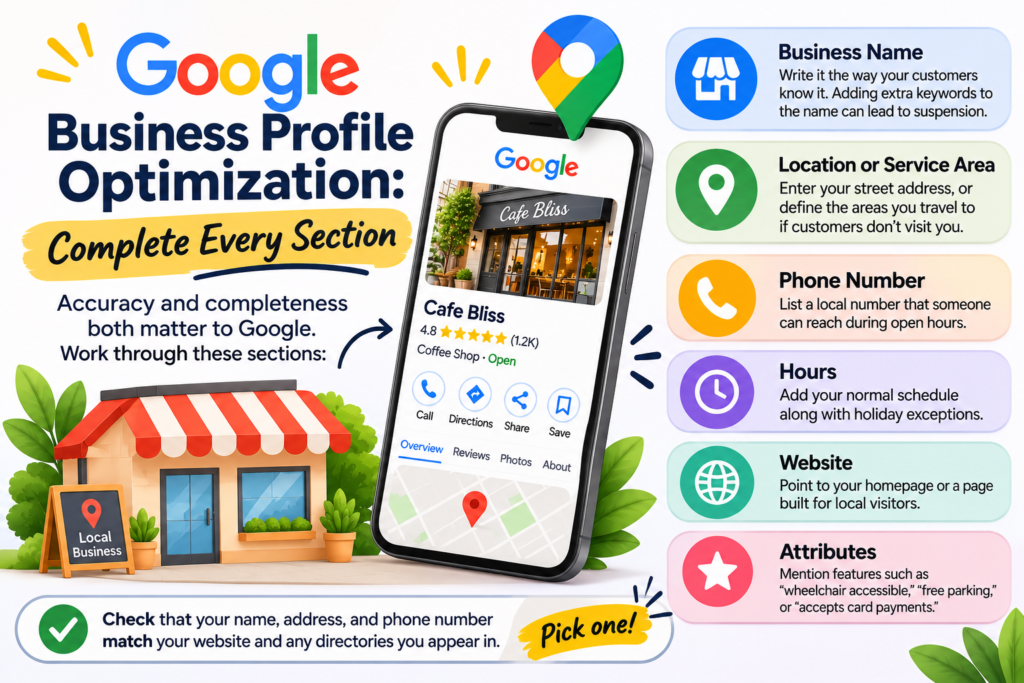
Google cares about accuracy and completeness. Work through these sections:
- Business name: Write it the way your customers know it. Adding extra keywords to the name can lead to suspension.
- Location or service area: Enter your street address, or define the areas you travel to if customers don’t visit you.
- Phone number: List a local number that someone can reach during open hours.
- Hours: Add your normal schedule along with holiday exceptions.
- Website: Point to your homepage or a page built for local visitors.
- Attributes: Mention features such as “wheelchair accessible,” “free parking,” or “accepts card payments.”
Check that your name, address, and phone number match your website and any directories you appear in. Pick one style for abbreviations, like “Avenue” versus “Ave.,” and stick with it everywhere. Inconsistent details make it harder for both search engines and people to trust your information.
Consistent Google Business Profile optimization also means checking your business details regularly and updating them whenever your contact information, location, or opening hours change. This helps customers find accurate information and contact your business without confusion.
Choose the Right Categories for Google Business Profile Optimization
The primary category is the most important label on your profile because it tells Google what you do. Select the narrowest option available. A listing marked “Italian restaurant” performs better for relevant searches than one marked only “Restaurant.” Add secondary categories for other services you provide, and review them every few months since Google introduces new options over time.
Avoid choosing categories just because they sound popular. If a category doesn’t describe your main work, it can bring in the wrong inquiries. Looking at which categories your strongest local competitors use is a practical way to decide.
To understand the main factors that influence local search visibility, read Google’s guidelines on improving local ranking.
Write an Effective Google Business Profile Description
Your description gives you roughly 750 characters to explain who you are. Describe the work you do, the people you help, and the qualities that set you apart. Work in phrases your customers actually type, such as “same-day drain repair in Springfield” or “bakery making sourdough daily,” but keep the language natural. Sentences that read smoothly to a human also make the business easier for search engines to interpret.
Lead with concrete facts like years in business, service areas, or a specialty. Phrases like “the best service around” tell readers very little, while specifics such as “serving Maple County since 1998” are far more persuasive.
Add Services and Products to Your Google Business Profile
The Services and Products sections are often skipped, yet they give customers a clear view of your offerings. Add each service with a short title and a sentence or two of detail. If your prices are standard, show them, because customers appreciate knowing the cost before they call.
If people can book or order online, include that link. The easier you make the next step, the more likely a visitor is to take it.
Google Business Profile Optimization: Photo Tips
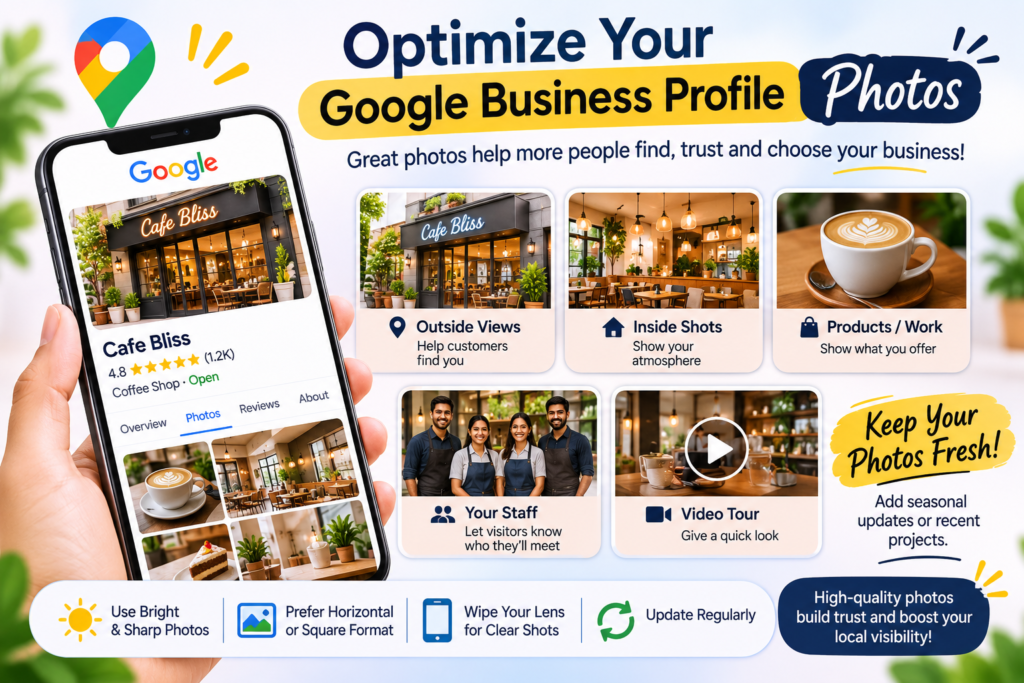
Profiles with photos tend to earn more clicks and direction requests than those without. Aim to include:
- Outside views that help customers locate you
- Inside shots that convey your atmosphere
- Examples of your products or completed work
- Pictures of your staff so visitors know who they’ll meet
- A brief video tour if you can film one
Bright, sharp photos in horizontal or square framing look best. A modern smartphone can produce strong results in good daylight if you wipe the lens first. Refresh your gallery regularly, because new images tell both Google and customers that the business is active. Seasonal displays or a recent project make excellent additions.
Regularly updating your photos is an important part of Google Business Profile optimization. Add new images whenever you complete a project, introduce a product, or make changes to your business. Fresh, relevant photos help customers understand your services and keep your profile informative and engaging.
Get More Reviews with Google Business Profile Optimization
Reviews influence how customers perceive your business and can contribute to local prominence. As part of Google Business Profile optimization, ask satisfied customers to leave honest feedback after they use your services. You can share a review link directly from your profile. A friendly message like “Thanks for trusting us. Would you mind sharing your experience here?” is usually enough.
Reply to every review. For praise, express real gratitude and mention the specific detail the customer noticed. For complaints, acknowledge the problem, apologize where appropriate, and describe how you’ll fix it. Readers often trust a business more when they see it handle criticism well. Do not pay for reviews or offer rewards for them, because Google does not allow this and fake feedback can cost you your listing.
Consistent review management is an important part of Google Business Profile optimization. Check your reviews regularly, respond politely to customer concerns, and use genuine feedback to identify areas where your business can improve. This shows potential customers that you value their opinions and are committed to providing better service.
You can also follow Google’s official guidelines for getting more customer reviews to encourage genuine feedback and manage reviews appropriately.
Publish Regular Google Business Profile Posts
Posts appear directly within your profile and can highlight promotions, announcements, and events. Aim for at least one new post each week. Strong topics include seasonal specials, a service you just launched, a short look behind the scenes, or a finished job. End every post with a clear next step, such as “Call us today” or “Reserve your spot online.”
Batching your work saves time. Set aside half an hour at the beginning of each month to draft four or five posts and schedule them. Consistency tends to matter more than polished copy.
Manage Questions and Messages on Your Google Business Profile
Customers frequently post questions on your profile. Check that section regularly and respond promptly. You can also write and publish common questions yourself, which helps you address concerns before they become obstacles. Topics such as parking availability, accepted payment types, or whether appointments are required make good candidates. If messaging is enabled for your listing, reply quickly during business hours.
Keep Your Google Business Profile Information Updated
Old information can cost you calls. Change your hours before holidays, when you move, or when you add a new service. Confirm that the phone number connects and that the website link opens a working page. Put a recurring reminder on your calendar to review the entire profile every three months. A few minutes of checking can prevent a lost customer.
Track Results with Google Business Profile Performance Data
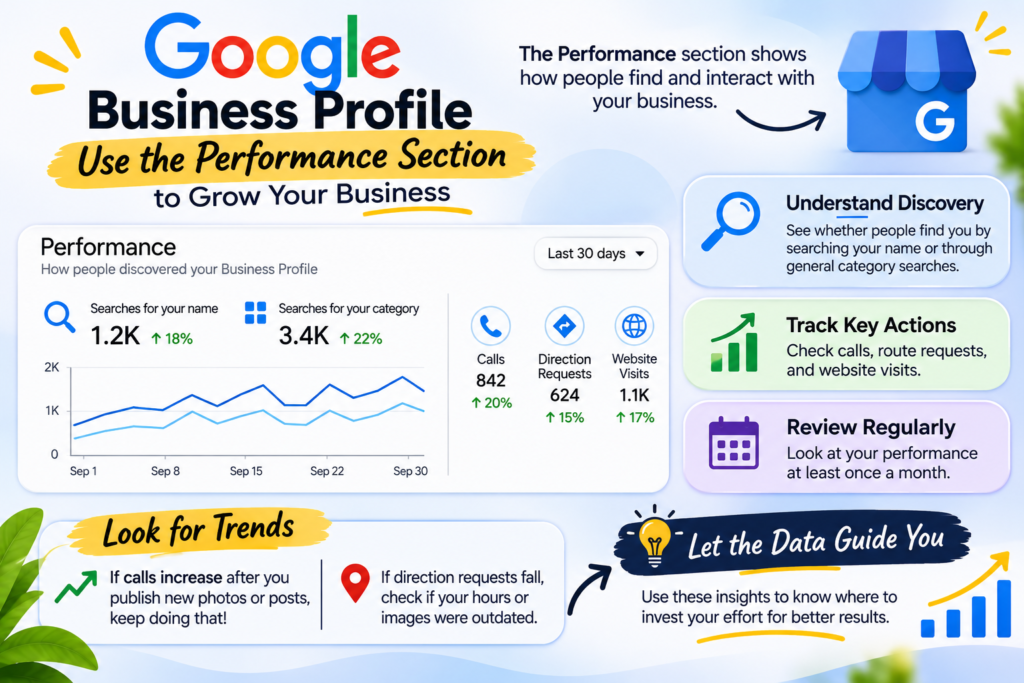
The performance section of your dashboard reveals how people discover your business. It separates customers who searched for your name from those who found you through general category searches. It also reports calls, route requests, and website visits. Look at these figures once a month.
Watch for trends. If calls increase after you publish new photos or posts, continue that approach. If direction requests fall during a particular month, see whether your hours or images were out of date at that time. Let the data guide where you invest your effort.
Common Google Business Profile Optimization Mistakes
Several common errors can weaken your listing:
- Listing a virtual office or mailbox when you have a real storefront
- Stuffing keywords into your business name
- Leaving negative reviews unanswered
- Forgetting to update holiday hours
- Opening multiple profiles for one business
- Purchasing fake reviews
Duplicate listings are especially harmful. They divide your reviews and confuse visitors. If you discover extra profiles, request their removal or merge them through Google’s support channels.
How to Improve Your Google Business Profile Optimization Today
You don’t need a large budget or technical expertise to improve your Google Business Profile optimization. Start by confirming ownership, completing every section, updating your photos, and responding to customer reviews. Make it a habit to review your profile information and performance every month. By following these simple steps consistently, you can help more local customers discover your business online.
If you want to learn more about improving your online presence, explore my digital marketing website for helpful information about digital marketing, SEO, and online visibility.